Web Development
Web Development Classes for Kids
Help your child build and publish real websites with live mentor guidance
- Grades
- Class 4–12
- Duration
- 33 live sessions
- Projects
- 60+ activities
- Rating
- 4.8 (410+)
10+ Projects
- HTML, CSS & JavaScript from first tag to live portfolio
- 10+ publishable web projects with live mentors
- Beginner friendly — no prior coding needed
- 33 live sessions of project-based classes
What Web Development covers
GeekashramJr's Web Development course teaches students Class 4–12 to build real websites with HTML, CSS, and JavaScript through live mentor-led classes. Across 6–9 months (about 40+ sessions), students learn how browsers work, style responsive pages, add interactivity with JavaScript, and publish a personal portfolio site — plus quizzes, forms, and mini web apps along the way.
By the end, your child will have
- Published a responsive personal portfolio website they can share with family and teachers
- Built an interactive quiz or game page with HTML, CSS, and JavaScript
- Created styled forms and multi-section landing pages with mobile-friendly layouts
- Live mentor-led sessions
- 33Live mentor-led sessions
- Publishable web projects
- 10+Publishable web projects
- Mentor attention available
- 1:1Mentor attention available
- Parent updates & support
- 24/7Parent updates & support
This course is for your child if they are…
A Curious Creator
Loves drawing, games, or stories and wants to turn ideas into websites.
A School Explorer
Needs structured coding exposure beyond crowded classroom time.
A Future Builder
Wants a visible portfolio to show family, teachers, or competitions.
A Confident Starter
Ready to learn step by step with patient live mentors online.
Web Development syllabus at a glance
Typical full-course pace: 33 live sessions. Modules run in order, and mentors adjust depth to the student.
| # | Module | Duration | Topics covered | Projects |
|---|---|---|---|---|
| 1 | Web Foundations | 5 sessions | How browsers and the internet work; HTML structure, tags, links, and images; Semantic pages and accessibility basics | First HTML page; Photo gallery page |
| 2 | Styling & Layout | 8–10 sessions | CSS colors, fonts, and spacing; Flexbox and responsive layouts; Mobile-friendly design patterns | Responsive profile card; Multi-section landing page |
| 3 | JavaScript | 10–12 sessions | Variables, events, and DOM updates; Buttons, forms, and simple animations; Debugging and testing in the browser | Interactive quiz; Form + validation mini-app |
| 4 | Capstone | 5–6 sessions | Personal portfolio website; Interactive quiz or game page; Publish and present the final project | Personal portfolio website; Publish & present live |
Projects students actually build
A sample of the work that comes out of Web Development — every one built live with a mentor, not followed along from a video.
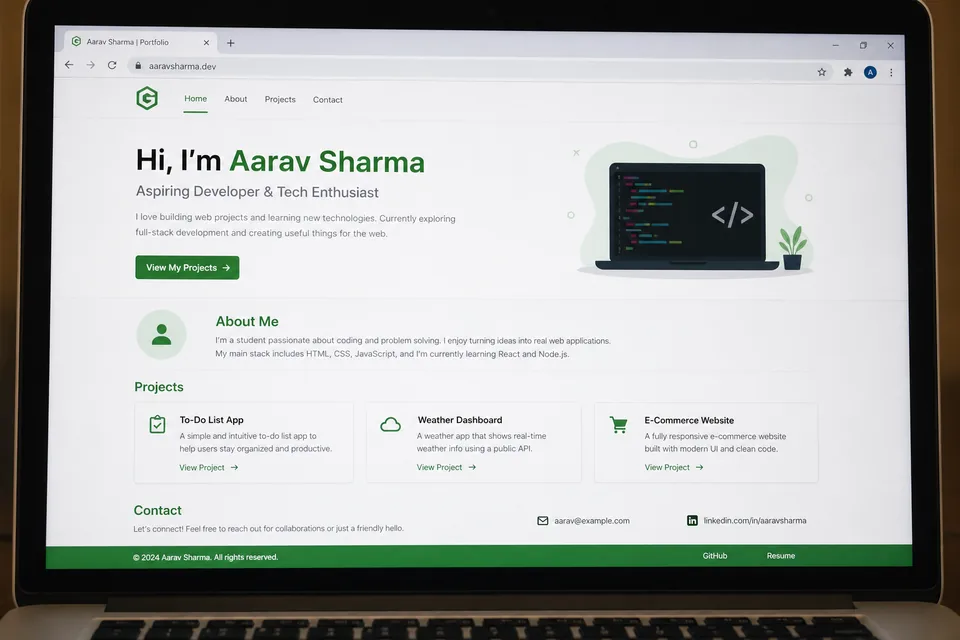
Personal portfolio website
Students design and publish a multi-page portfolio with an about section, project gallery, and contact form — their first site live on the web.
- HTML
- CSS
- Responsive layout
- Publishing
Interactive quiz page
A themed trivia or math quiz with score tracking, instant feedback, and custom styling — teaching DOM events and JavaScript logic.
- JavaScript
- DOM events
- Forms
Responsive landing page
A product or hobby landing page with hero banner, feature cards, and a call-to-action button — built with flexbox and responsive CSS.
- Flexbox
- CSS
- UI design
Skills covered
- HTML
- CSS
- JavaScript
- Responsive design
- Portfolio project
- Design thinking
Prerequisites & who can join
No prior coding experience needed. A laptop with a modern browser and stable internet is enough to start.
- Grade range
- Class 4–12
- Estimated duration
- 33 live sessions
- Class format
- Live online with GeekashramJr mentors
Web Development — questions parents ask
Straight answers on syllabus depth, projects, pace and pricing for live Web Development classes.
GeekashramJr's Web Development course teaches students Class 4–12 to build real websites with HTML, CSS, and JavaScript through live mentor-led classes. Across 6–9 months (about 40+ sessions), students learn how browsers work, style responsive pages, add interactivity with JavaScript, and publish a personal portfolio site — plus quizzes, forms, and mini web apps along the way.
Web Development is taught live module by module (33 live sessions). Parents can review the full syllabus table on this page — topics, projects, and typical session time per module — plus download the curriculum brochure.
Students complete mentor-guided projects throughout the course. By the end they typically have: Published a responsive personal portfolio website they can share with family and teachers; Built an interactive quiz or game page with HTML, CSS, and JavaScript; Created styled forms and multi-section landing pages with mobile-friendly layouts. Sample project screenshots and walkthroughs are shown above.
Web Development is for students in Class 4–12 (Class 3 to 12 at GeekashramJr). No prior coding experience needed. A laptop with a modern browser and stable internet is enough to start.
GeekashramJr Explorers starts at ₹499 per session (5 students), Champions is ₹799 per session (3 students), and Super Mentors 1:1 is ₹999 per session. Try a session to see the teaching style before choosing a plan. The trial fee is adjusted on enrolment.
Classes are live online with GeekashramJr mentors — not passive video courses. Students get real-time feedback, debugging help, and project reviews in every session.
Students learn HTML, CSS, and JavaScript step by step — building responsive pages, forms, quizzes, and interactive apps, then publishing a real portfolio website with live mentor support.
No prior coding experience is needed. Mentors start from the basics and guide students through their first tags to a published portfolio website.
Yes. The capstone is a personal portfolio students can share with family and teachers. Mentors help with publishing, presentation, and polishing the final pages.
Most students complete the track in about 6–9 months (40+ live sessions), depending on pace, attendance, and how deep they go on portfolio polish.
Related reading
Parent guides and STEM articles that pair well with Web Development.
- Coding for Kids12 Minutes
Coding for Kids: The Complete Parent's Guide (Ages 6–18)
Not sure when your child should start coding, or whether to pick Scratch, Python, or something else? This friendly parent's guide covers ages 6–18, courses, screen time, and simple next steps—without the jargon.
Read - Coding for Kids9 Minutes
Coding is the New English: The Skill Every Child Needs in 2026
In 2026, coding is becoming as essential as English for kids — not to make every child a software engineer, but to help them think clearly, create with technology, and stay confident in an AI-first world. A parent guide from GeekashramJr mentor Shivam Jha.
Read - Coding for Kids7 Minutes
Is Coding Good for an 8-Year-Old? Best Age to Start Coding | 2026
Yes — coding is good for most 8-year-olds when lessons are visual, short, and project-based. This 2026 parent guide covers the best age to start, Scratch vs Python, screen-time worries, and how to choose the first coding class.
Read - Coding for Kids7 Minutes
Best Coding Language for Kids in 2026: Scratch vs Python vs JavaScript
The best coding language for kids in 2026 depends on age: Scratch for ages 7–10, Python for Class 6+ and teens, JavaScript for websites, and robotics for hands-on builders. Compare options and pick the right first path.
Read - Coding for Kids7 Minutes
What Age Should Kids Start Learning to Code? Parent Guide | 2026
Most kids can start coding around ages 7–8 with visual tools; typed languages like Python usually fit better from Class 5–6. Here is a clear age-by-age parent guide for when to start coding in 2026.
Read
Not sure which track fits your child?
Book a 45-minute trial session. A mentor works with your child, sees how they think, and recommends the track. The trial fee is adjusted if you continue.